Overview
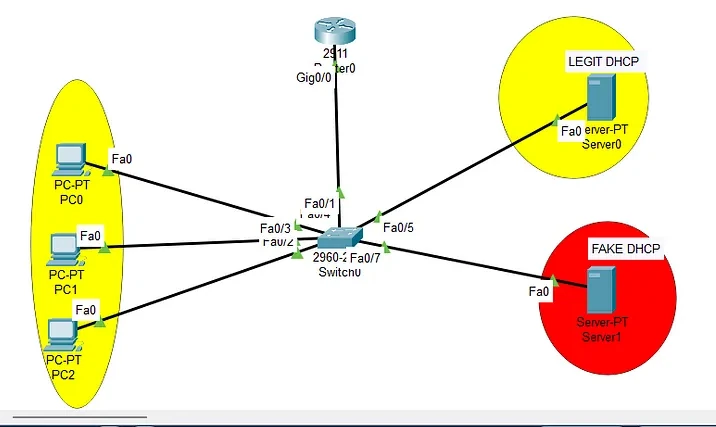
In this lab, we’ll implement foundational Layer 2 security mechanisms on a Cisco Catalyst 3560X switch. These features protect against common attack vectors like ARP spoofing, rogue DHCP servers, and IP address impersonation. This lab also incorporates inter-VLAN routing using our 3560x (Requires GNS3).
Security Mechanisms Covered:
- DHCP Snooping
- Dynamic ARP Inspection (DAI)
- IP Source Guard (IPSG)
Lab Topology (GNS3 / Packet Tracer)
| Device | Interface | Description |
|---|---|---|
| Switch | Fa0/2-4 | PCs (VLAN 10) |
| Fa0/5 | Legit DHCP Server | |
| Fa0/6 | PC on VLAN 20 | |
| Fa0/7 | Rogue DHCP Server |
VLAN Assignments:
- VLAN 10: Workstations
- VLAN 20: Admin PCs
- VLAN 99: Management (optional)
Objective
- Set up inter-VLAN routing via SVIs on the switch.
- Enforce Layer 2 security on the switch.
- Simulate DHCP attacks and demonstrate feature effectiveness.
Part 1: VLAN and Routing Configuration
On the Switch (3560X):
Switch(config)# ip routing

Switch(config)# vlan 10
Switch(config-vlan)# name USERS
Switch(config-vlan)# exit

Switch(config)# vlan 20
Switch(config-vlan)# name ADMIN
Switch(config-vlan)# exit

Switch(config)# interface range fa0/2 - 4
Switch(config-if-range)# switchport access vlan 10
Switch(config-if-range)# switchport mode access
Switch(config-if-range)# exit

Switch(config)# interface fa0/6
Switch(config-if)# switchport access vlan 20
Switch(config-if)# switchport mode access
Switch(config-if)# exit

Switch(config)# interface fa0/5
Switch(config-if)# switchport access vlan 10
Switch(config-if)# switchport mode access
Switch(config-if)# exit

Switch(config)# interface fa0/7
Switch(config-if)# switchport access vlan 10
Switch(config-if)# switchport mode access
Switch(config-if)# exit
Create SVIs for Routing:
Switch(config)# interface vlan 10
Switch(config-if)# ip address 192.168.10.1 255.255.255.0
Switch(config-if)# no shutdown
Switch(config-if)# exit

Switch(config)# interface vlan 20
Switch(config-if)# ip address 192.168.20.1 255.255.255.0
Switch(config-if)# no shutdown
Switch(config-if)# exit
Ensure the switch has a default route if needed:
Switch(config)# ip route 0.0.0.0 0.0.0.0 <gateway-if-necessary>
Part 2: DHCP Snooping Configuration
Enable Globally and for VLANs:
Switch(config)# ip dhcp snooping
Switch(config)# ip dhcp snooping vlan 10,20
Trust Legitimate DHCP Server Port:
Switch(config)# interface fa0/5
Switch(config-if)# ip dhcp snooping trust
Switch(config-if)# exit
Verification:
Switch# show ip dhcp snooping
Switch# show ip dhcp snooping binding
Part 3: Dynamic ARP Inspection (DAI)
Enable DAI for VLANs:
Switch(config)# ip arp inspection vlan 10,20
Trust DHCP Server Port:
Switch(config)# interface fa0/5
Switch(config-if)# ip arp inspection trust
Switch(config-if)# exit
Verification:
Switch# show ip arp inspection interfaces
Switch# show ip arp inspection vlan 10
Switch# show ip arp inspection vlan 20
Part 4: IP Source Guard (IPSG)
Apply to Access Ports:
Switch(config)# interface range fa0/2 - 4, fa0/6
Switch(config-if-range)# ip verify source
Switch(config-if-range)# exit
Verification:
Switch# show ip verify source
Part 5: Testing the Configuration
-
Connect Legit PC (e.g., PC0 on Fa0/2)
- Should receive IP from Legit DHCP (Fa0/5)
- Verify using ipconfig or ip addr on PC
-
Connect Rogue DHCP Server (Fa0/7)
- Should be blocked by DHCP Snooping
- Run packet capture or check show ip dhcp snooping binding
-
Try ARP Spoofing from PC1 (Fa0/3)
- Should be blocked by DAI
-
Spoof IP on PC2 (Fa0/4)
- Manually assign a mismatched IP
- Should be blocked by IP Source Guard
Summary of Interface Roles
| Interface | Role | VLAN | Trusted? |
|---|---|---|---|
| Fa0/2–4 | Workstations | 10 | No |
| Fa0/5 | Legit DHCP Server | 10 | Yes |
| Fa0/6 | Admin PC | 20 | No |
| Fa0/7 | Rogue DHCP | 10 | No |
Conclusion
By combining DHCP Snooping, Dynamic ARP Inspection, and IP Source Guard, we create a layered security posture against the most common Layer 2 threats (defense in depth!):
- Rogue DHCP servers are suppressed
- Malicious ARP replies are filtered
- IP/MAC spoofing attempts are blocked at the port level
SVI-based routing makes this topology realistic for enterprise L3 switch deployments, where inter-VLAN routing is handled locally without a router-on-a-stick setup.
Next Steps
Future labs may explore:
- 802.1X with RADIUS integration
- Sticky MAC with Port Security
- Automating switch hardening via EEM or Ansible
Thank you for reading, and may your networks stay secure.
— Damon Hoody