It has been a little over two months since I started my new job and dove into Cisco voice. At that point, most of what I was learning could still be explained with a diagram: a phone registers to CUCM, CUCM decides where the call should go, SIP handles signaling, SDP describes the session, and RTP carries the audio.
That foundation is still important, but the past few months have been much more about what happens when the diagram stops matching reality. I have had the opportunity to work on upgrades involving entire Cisco Unified Communications environments, including CUCM, IM and Presence, Unity Connection, and Cisco Emergency Responder publishers and subscribers. I have installed and licensed paging systems, worked through OAuth problems, chased RTP through firewalls, dealt with SFTP and cipher compatibility, followed SIP calls through carriers, worked with Cisco TAC, learned more about Unity call handlers, and spent a lot of time building automation in Akkadian Provisioning Manager.
I am still very early in learning all of this, and I obviously cannot turn this site into documentation of customer environments or post configurations from production systems. What I can document are the problems themselves, the technologies involved, and what they have taught me about how voice actually works outside of a textbook. That is becoming the part I enjoy the most.
Upgrading CUCM from CentOS to AlmaLinux on 15
One upgrade in particular taught me more than I expected. The cluster was running a 14.0.1.11900 release of CUCM, and the eventual goal was to move it to version 15 on new virtual machines.
On paper, the process sounded fairly straightforward: move the data, build the new VM, import the data, and move on. The problem was that moving the data required working SFTP, and SFTP was exactly what was not cooperating.
I was running into a strange situation where the system I needed to back up and export was also the system that would not successfully communicate with the SFTP destination I needed for the migration. Before making a major change to CUCM, I obviously wanted a valid backup. To migrate the configuration into the new version 15 VM, I also needed a successful dataexport. Both depended on SFTP, and SFTP was broken.
The preparation step for the upgrade had effectively become the thing preventing the upgrade. This is the kind of problem that does not really show up in a diagram of an upgrade path.
To add to that, this was my first full cluster upgrade, so I was also trying to separate an actual application problem from everything I did not know yet. I had to consider whether a firewall was blocking something, whether the SFTP server was configured incorrectly, whether CUCM disliked the available ciphers, or whether I was simply missing something obvious because the environment was still new to me.
The Upgrade Before the Upgrade
The solution ended up being another upgrade. Before I could migrate the system to 15, I first performed an in-place upgrade of the existing CUCM environment to 14SU2.
That intermediate upgrade was not the original destination. It was there because I needed to get the existing system into a state where I could reliably perform the backup and data export required for the actual migration. After moving to 14SU2, I was able to get the SFTP side working correctly and continue with the migration.
From there, the process made a lot more sense. The existing cluster could export its configuration and data to the SFTP server, and the new version 15 virtual machines could be built and import that data rather than trying to drag the existing VM all the way through the upgrade.
What I liked about this problem was how backwards it initially felt: I needed to upgrade CUCM so that I could back up CUCM so that I could upgrade CUCM. It sounds ridiculous when written out, but it worked, and it changed the way I think about upgrade paths.
The question is not always Can version A upgrade to version B? Sometimes the better question is What state does version A need to be in before I can safely get its data into version B? Those are not necessarily the same thing.
When the Call Connects but Nobody Can Hear Anything
RTP troubleshooting has probably been my favorite part of the work so far because it is one of the best examples of why knowing networking still matters in voice.
A user can make a call, the destination can ring, the person can answer, and the call timer can start while there is still no audio or only one-way audio. That initially feels contradictory, but it really is not: the signaling worked while the media did not.
I have had the opportunity to troubleshoot RTP taking unexpected paths through firewalls, and it has forced me to pay much closer attention to the media information being negotiated during a call. SIP can establish the session successfully while SDP tells each endpoint to send RTP toward an address or port that the network cannot actually reach.
A firewall can permit the SIP signaling and block the media. A route can send the RTP somewhere completely different from the signaling. NAT can change what one side believes the other endpoint looks like. The call can therefore be completely valid from CUCM’s perspective while the users hear silence.
Once I started thinking about calls this way, troubleshooting them became much less mysterious. Instead of asking only Why is there no audio?, I can start asking what address each side advertised for media, which UDP ports were negotiated, where those packets should be routed, and where they are actually being routed. At that point, it becomes networking again.
Following the Evidence
I have also been spending much more time in Translator X. The first few times I looked through CallManager traces, they mostly looked like thousands of lines of reasons to close Notepad++, but Translator X makes that information much easier to follow.
Now I can start with a known call, find the relevant dialog, and follow the messages through the system. I can look at who sent the INVITE, what CUCM received, what digits CUCM routed, which trunk the call used, what the next device sent back, what was offered in SDP, whether something transformed the called number, whether the carrier rejected the call, whether signaling succeeded while media failed somewhere else, or whether the call routed through Session Manager first.
That changes troubleshooting from guessing at CUCM configuration to following evidence.
I have also gotten more experience working with CDRs and carrier records, which becomes especially useful when a problem crosses the boundary between our equipment and somebody else’s network. At some point I may be able to prove that the call entered CUCM, matched the expected route, left through the correct trunk, and received a particular SIP response. After that, the next useful question might belong to the carrier.
Working with carriers and Cisco TAC has made me better at defining exactly where a problem stops being understood. I do not always need to know the answer before opening a case, but I should be able to provide something better than Calling does not work. A timestamp, calling number, called number, affected node, trace, Call-ID, SIP response, and description of the expected behavior give somebody else an actual problem to investigate. That is a skill I want to continue improving.
MRA Has a Lot Behind It
I have also been working more with Mobile and Remote Access. MRA is another technology where the finished product hides how much infrastructure is underneath it.
From the user’s perspective, Jabber, Webex, or a supported phone is outside the network and still connects to the company’s calling environment. Behind that are Expressway-E, Expressway-C, DNS records, certificates, firewall rules, traversal connections, CUCM, IM and Presence, Unity Connection, authentication, and then OAuth on top of all of it.
I have been working with environments using OAuth for remote authentication, and it has been useful for understanding how all of these systems establish trust with one another. The interesting part is not memorizing which menu contains the setting; it is understanding the dependency.
If authentication fails, I need to know which system was actually responsible for authenticating the user. If discovery fails, I need to know what DNS record the client was looking for. If the client reaches Expressway-E but never gets any further, I need to understand what should happen next. If signaling works but media does not, I may be right back to an RTP problem.
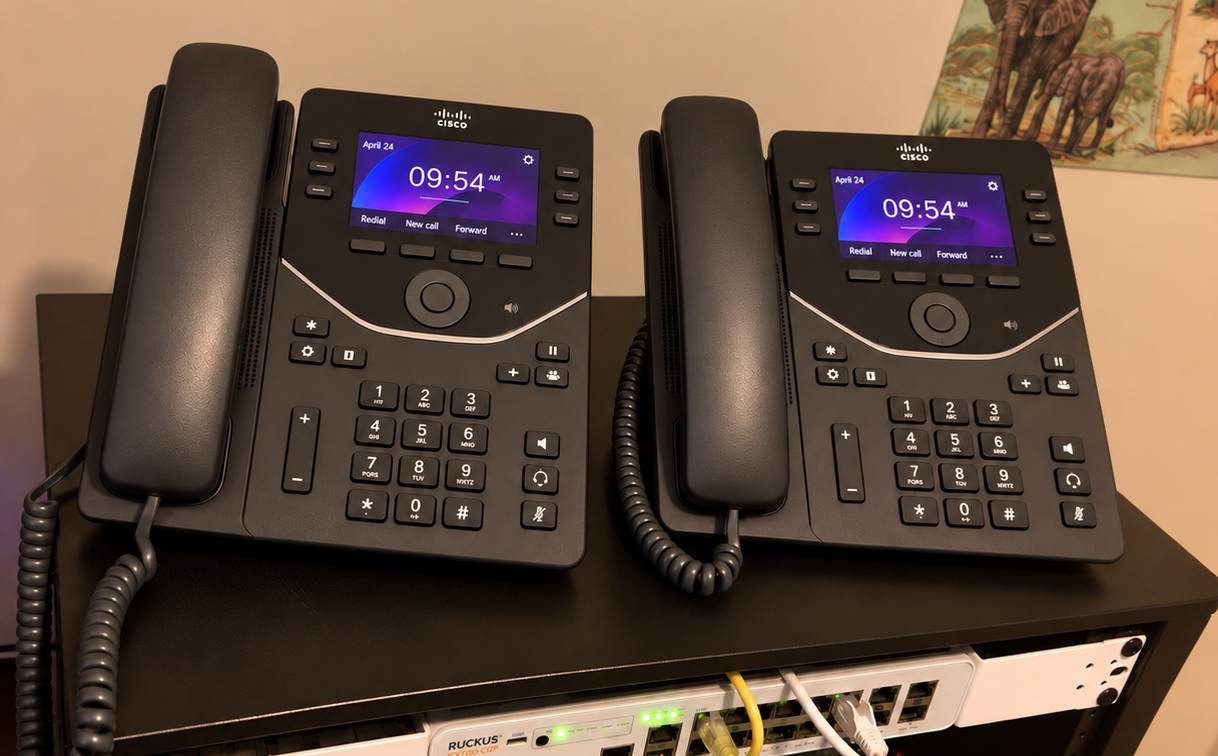
The more of the complete path I understand, the less I have to treat each application like a separate black box. I have a Cisco 7841 using MRA in my own homelab now, and being able to look at an actual phone on my desk while thinking through that path makes the architecture much easier to understand.
Automating Provisioning With Akkadian
One of the areas I have enjoyed the most has been working with Akkadian Provisioning Manager. I already had a bit of experience working at CVCC, but this has been a different kind of learning now at NEONet because it is less about one phone and more about defining how phones should be built for customers in the first place.
Manually provisioning a phone forces you to understand the individual CUCM objects. A device needs a device pool, a line needs a partition, and users and devices need Calling Search Spaces. There are also locations, regions, button templates, voicemail profiles, services, device associations, and plenty of other pieces depending on the environment.
Doing that manually teaches the configuration, while automating it forces you to understand the relationships between the configuration. I have been building and modifying jobs and templates for different clusters, working with Phone Control, and figuring out how to turn the standards of an environment into something repeatable.
That is the part I find interesting. The goal is not simply to automate mouse clicks. If every phone at a particular site should be configured a particular way, the provisioning workflow should already understand those requirements. The technician should not have to remember fifteen different CUCM fields every time somebody needs a phone because the template should already know.
I have also been working on handing portions of that access back to the same kinds of customers I worked for a few months ago so they can perform the tasks they need without being given unrestricted access to everything underneath it. That changes the problem from simple automation into abstraction and access control.
Now I have to think about what a person should be able to change, what the job should decide automatically, what should never be exposed, and what needs to be standardized so that the same request produces the same configuration every time. Those are much broader engineering questions than I expected to encounter while learning phone provisioning, and they are also some of the most interesting.
What Cisco Voice Has Changed for Me
When I started this position, Cisco voice was the unfamiliar part. Routing and switching made sense to me, firewalls made sense to me, and packet captures made sense to me. CUCM was the giant application full of menus that somehow made phones ring.
That is starting to change. I am still nowhere close to knowing everything inside these systems, but I am starting to see how the pieces connect.
A CUCM problem might really be an SFTP negotiation problem. An ATA that does not register may turn out to be an asymmetric routing problem. An MRA problem might really be DNS, certificates, OAuth, or a firewall. A voicemail problem might actually be Unity call-handler logic, while a provisioning problem might be better solved by changing the template instead of changing another phone manually.
The application at the top changes, but the troubleshooting process underneath it is surprisingly familiar: figure out what should happen, collect evidence about what actually happened, and find the point where those two things stop matching. That is basically why I built this blog in the first place.
Bringing More of It Into the Homelab
The next thing I want to do is recreate more of this at home. My current voice lab is still pretty small, with a Layer 3 PoE switch, the MRA 7841, Cisco CML, and remote access to my servers and firewalls off site.
I want to turn that into something where I can build and deliberately break a complete voice path. The CAT8000V routers from my WGU capstone are a good starting point.
I would like to use CML for the surrounding network and experiment with CUBE, SIP trunks, routing, NAT, firewalls, and WAN behavior while keeping applications such as CUCM on normal virtual machines. I also want to experiment with CME separately and compare the experience of having call control directly on IOS XE with a larger CUCM deployment.
Eventually, I would like a real inexpensive SIP trunk through something like VoIP.ms, a few physical phones, and softphones such as PhonerLite. The goal is not just to get a known-good call working, but to capture it and then deliberately change one thing at a time.
I want to change the media address, break a route, block RTP, change the codec, mess up a dial peer, transform the wrong digits, break DNS, change NAT, expire a certificate, and break the SIP trunk. Then I can capture the failure and compare it to the working call.
That is the kind of lab I think will be most useful to me now. Getting a phone to ring is good, but understanding exactly why it does not ring is better.
What’s Next
The more Cisco voice I learn, the less separate it feels from the rest of networking. It sits on top of routing, switching, DNS, NTP, virtualization, certificates, firewalls, NAT, Linux, APIs, authentication, and a lot of other systems I was already interested in.
The difference is that voice ties all of them together in a way that makes failures immediately obvious to humans. Voice traffic is also unusually sensitive to delay, loss, and path problems, so when something goes wrong, somebody usually notices quickly. A web application taking another two seconds to load might be ignored; RTP going the wrong direction usually will not be.
I still want to write detailed labs about CUCM, CUBE, CML, SIP, RTP, and the other technologies I am learning, but I also want to document more of the problems that do not fit neatly into a lab guide: the upgrade that required another upgrade before it could happen, the working call with no audio, or the SFTP server that worked perfectly except for the application that actually needed to use it.
Those situations are where I have learned the most, and they are also a much better representation of how networks seem to work outside of a textbook.
Thanks for reading, and God bless.
